強力推薦

必看推介

顯示具有 系統優化 標籤的文章。 顯示所有文章

星期六, 5月 30, 2009

[軟件] 提升系統效能小工具

1 意見


相信使用 Windows 的用戶都知道,剛安裝完成的 Windows 作業系統大部份預設的設定都不是效能最佳化的,如果用戶欲想設定某一功能或禁止某一功能的設定時,可能會到控制台、系統內容等等的地方來修改某一些設定,或自行修改登陸設定。用戶如果只是想修改某幾項,是可以很快的設定完成,但如果修改的項目太多時,這可能會花上好一段時間或氣力才能完成設定,或會找一些系統調校工具來幫您修改這些數目不少的設定。

EwTweak 就是一個可供用戶方便快捷的完成修改 Windows 作業系統這些數目不少而又隱藏的優化效能設定的系統工具程式,EwTweak 的使用界面非常簡單,用戶幾乎一看便會明白如何使用,現時 EwTweak 版本只有一個修改按鈕,使用時只要選擇了所需修改的頁面後,再選擇所需要修改的項目,在該頁面中按下修改設定按鈕,EwTweak 便會按照您所選擇的項目來修改或優化、禁止等這些設定,就只要幾個步驟便可以輕鬆的優化您的 Windows 系統。

EwTweak 的設定頁面包括如下:[桌面、登入],[開始功能表],[系統、外觀],[網路禁止、本機禁止],[硬件,滑鼠],[網路優化],[桌面圖示、我的電腦圖 示],[Internet Explorer] 等項目。

EwTweak 還可以幫您快捷的開啟系統內置的程式,例如:系統公用 程式、群組原則等等,不需要用戶在執行中輸入開啟系統內置程式的命令,便可以開啟這些系統內置而又實用的程式,非常的方便。

 軟件提供的下載: zSHARE RapidShare Badongo Megaupload

星期六, 4月 25, 2009

[軟件] 令玩遊戲及電腦更流暢的小工具 (Game Booster)

0 意見

玩遊戲往往都想順暢,而 IObitGame Booster 可能幫到你。只看程式名字就知道專門為 Game Boost。但其實對平時使用也能幫助,不竟它原理其實是將一些暫時不必要的 system services (系統服務)停止,釋放緩存、優化處理器性能。(IObit 的軟件蠻有信心保證^^)


它也會檢查一些懷疑不必要的程式,建議你關閉
(P.S. 如果不肯定還是略過比較好)


當然,如果不需要後,記得恢復正常模式,不然可能有些軟件不能正常運作,因為不竟需要這些系統服務支持的!


Designed to help optimize your PC for smoother, more responsive game play in the latest PC games with the touch of a button, Game Booster helps achieve the performance edge previously only available to highly technical enthusiasts. It works by temporarily shutting down background processes, cleaning RAM, and intensifying processor performance. That means you can keep all the features of Microsoft® Windows Vista® and XP® ready for when you need them, but turn them off when you are ready to get down to serious business – gaming. Game Booster makes it simpler to enjoy the latest games and take your experience to a new level. All systems go!

License: Freeware.
File Size: 709 KB
Operating System: Designed for Windows 7, Vista™, XP(32bit and 64bit), 2000
Release Date: April 20, 2009
Designed to: Make your games running at peak performance.
Languages: English, Danish, German, Finnish, Dutch, Hungarian, Indonesian, Italian, Serbian, Turkish, Russian, French, Brazilian Portuguese, Spanish, Korean, Czech, 简体中文, 繁體中文

 軟件提供的下載: Download.Cnet 官方下載頁

星期二, 11月 25, 2008

IObit Smart Defrag 1.03 磁碟重組

0 意見


IObit Smart Defrag 是一款體積少而且會靜靜分析和智能型在後台幫你磁碟重組,務求不會影響用家速度下幫用家保持硬碟最佳狀態的小巧軟件,而且 1.01 版以後更加入繁體版本,不妨試用一下吧
,當然也可以安裝在USB 下使用^^

官方網頁
(P.S. 用預設的 www.download.com 下載還是 1.02版,要使用 Mirror download 才有 1.03 版下載)


What's New1.03 (Nov 24, 2008)

* Optimized "Auto Defrag" function
* Improved user interface
* Fixed general bugs


1.02 (Oct 24, 2008)

* Fixed a compatible bug
* Fixed general bugs

星期六, 10月 25, 2008

IObit Smart Defrag 1.01 磁碟重組

0 意見

IObit Smart Defrag 是一款體積少而且會靜靜分析和智能型在後台幫你磁碟重組,務求不會影響用家速度下幫用家保持硬碟最佳狀態的小巧軟件,而且 1.01 版更加入繁體版本,不妨試用一下吧
,當然也可以安裝在USB 下使用^^

- An "Install It and Forget It" feature that works automatically and quietly in the background on your computer.
- The ability to constantly keep your hard drive safe, error-free and running at its top speed and optimum performance.
- Eliminates slow downs, freeze-ups and crashes.
- Smart Defrag is 100% FREE award-winning software that’s for personal, home and small business.
- 100% safe from any spyware, adware and virus.
- Designed for Windows Vista, XP, and 2000, including Windows Server Eiditions.
- 100% Free for home, small business, organization, and enterprise.
- Distribute it freely, copy it, or include it as part of a package – as long as it is left completely intact and unchanged.

1.01 (Oct 17,2008)
* Optimized fragmentation analysis algorithm* Improved GUI* Improved multi-language support* Fixed general bugs
1.0 (Sep 10, 2008)
+ The 1st official version released

官方網頁

星期二, 8月 26, 2008

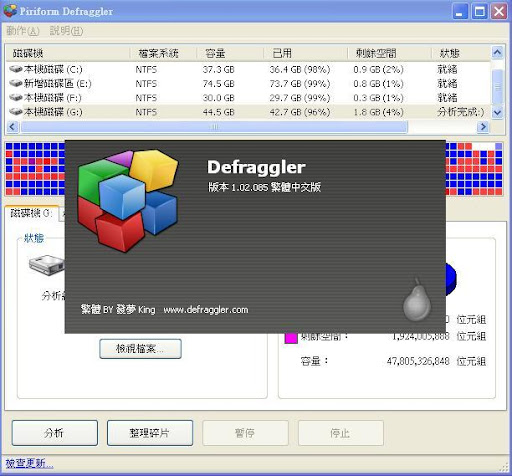
小巧磁碟重組 Defraggler v.1.02.085 (中文版)

0 意見


Defraggler v.1.02.085 (中文版)

Piriform 的格言就是 The Best software is Free , 所以其下的 CCleanerDefraggerRecuva 也是免費的 ,而且每個軟件也真的是十分好用!!

Recuva 是一款檔案救援工具,始終有時候想救回不小心刪除的檔案,不妨使用此軟件感受下他們的格言~~

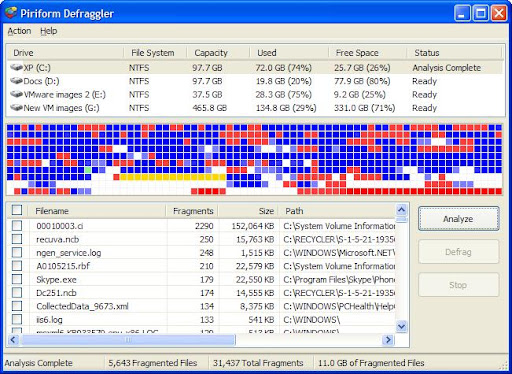
Defraggler是一款免費的磁碟重組工具,它的主程式大小不到 1MB,大家不妨使用此軟件感受下他們的格言~~ 也可以將「Defraggler.exe」這個執行檔複製到USB 手指到處使用唷...呵呵~~ (支援所有32位元的Windows 2000, XP, 2003 和 Vista)

v1.02.085 Final
- Improved progress indicator accuracy.
- Added checks for freespace.
- Various GUI and usability improvements.
- Fixed UI issues with large DPI settings.
- Fixed 64-bit compatibility issue that would ignore some files.
- Improved drive map (defragged files are now always marked as blue).
- Added background update checking.
- Fixed minor bug in progress indicator for chkdsk.
- Minor bug fixes.

v1.02.078 RC2
- Removed dialog prompts for actions.
- Improved GUI button placement.
- Fixed minor algorithm bugs.
- Minor UI tweaks.

v1.02.077 RC1
- New tabbed UI.
- Improved 64bit support.
- Fixed bug that could cause small files to be placed in MFT buffer zone.
- Minor bug fixes.

v1.01.073
- Completely new Defrag algorithm, which is faster and better designed.
- Defrag freespace now a separate option.
- Updated UI.
- Minor bug fixes.

官方網站
不懂下載請參考 如何下載 綠色軟件
中文版下載

星期二, 7月 08, 2008

免費的登錄檔碎片整理工具 Quicksys RegDefrag 1.5

0 意見


Quicksys RegDefrag 是一個免費的登錄檔碎片整理工具,它能分析登錄檔的無用鍵值,碎片和浪費的空間,優化登錄檔。

支援系統 : Windows 2000/XP/2003/Vista/2008 (x86/x64)

可到官方網站參考,可惜官方沒有繁體中文,不過本人另外漢化了,下載本站的就可以用了^^

星期二, 4月 15, 2008

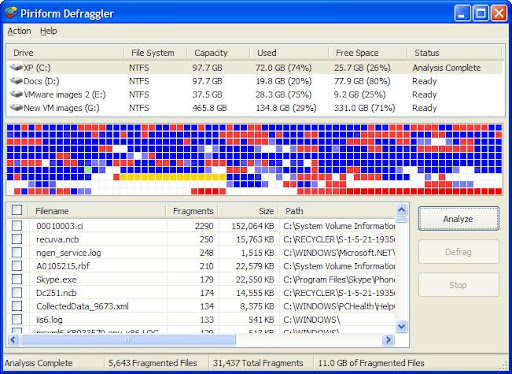
小巧磁碟重組 Defraggler v.1.01.068 (英文版) 和 v.1.01.064 (中文版)

0 意見


Defraggler v.1.01.068 (英文版) 和 v.1.01.064 (中文版)

Piriform 的格言就是 The Best software is Free , 所以其下的 CCleanerDefraggerRecuva 也是免費的 ,而且每個軟件也真的是十分好用!!

Recuva 是一款檔案救援工具,始終有時候想救回不小心刪除的檔案,不妨使用此軟件感受下他們的格言~~

Defraggler是一款免費的磁碟重組工具,它的主程式大小不到 1MB,大家不妨使用此軟件感受下他們的格言~~ 也可以將「Defraggler.exe」這個執行檔複製到USB 手指到處使用唷...呵呵~~ (支援所有32位元的Windows 2000, XP, 2003 和 Vista)

這次分別提供 v.1.01.068 (英文版) 和 v.1.01.064 (中文版)

v1.01.068
- Progress now displays current file.
- Window position, size and column widths now saved.
- Algorithm improvements.
- Speed improvements.
- Minor bug fixes.

v1.01.064
- Added df.exe command line version
- Added option to change process priority
- Fixed issue with files in the MFT buffer zone
- Fixed bug that left files in the list after they were defragged
- Minor bug fixes


。Defrag Individual Files
Most defragmentation tools only let you defrag the whole drive. Defraggler gives you the power to select individual files and folders to defrag. So you can get the job done in seconds, rather than waiting for the whole drive to complete. Of course if you want to defrag the whole drive Defraggler will let you do that too.

。Compact and Portable
Defraggler was written in the same compact architecture as other Piriform products (CCleaner and Recuva). This results in a compact single EXE application, which can be copied to a thumbdrive and then used whenever you need it, without a complex installation process. The EXE itself is less than 1MB!

。Vista Support
Defraggler supports all OSs released since Windows 2000, this includes Windows 2000, 2003, XP and Vista. 64-bit support has also just been added! Additionally Defraggler supports both NTFS and FAT32 file systems.

。Locate Files on the Drive
After analysis Defraggler lists all the fragmented files on the drive. Selecting one or many will highlight their location on the disk. Allowing you to visually see the location of files on the disk.

。Freeware
Why pay hundreds of dollars for a commercial defragmentation tool, when you can use Defraggler for free! This includes corporate use as well!

http://www.defraggler.com/

星期二, 4月 08, 2008

優化及壓縮記憶體 SmartRam

0 意見


SmartRam

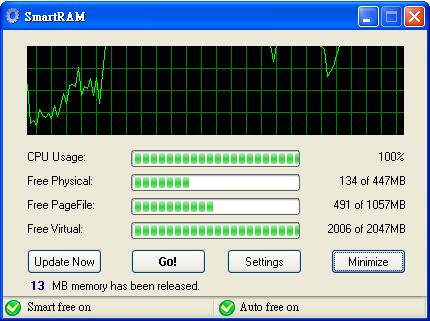
SmartRam 其實是 IOBit Advanced WindowsCare V2 中的一個小程式,今次抽出來介紹是因為真的非常好用!! 壓縮記憶體來令效能提升,壓縮時亦不感到會令系統變慢,一個字...強!

基本上操作十分簡單
按下〔Go〕立刻進行記憶體優化
按下〔Minimize〕縮小並在系統常註
按下〔Settings〕進入設定畫面

在〔Settings〕設定畫面中,勾選
「Run at windows startup」可以設定開機時就啟動
「Automatically free ram while system is idle」可以在系統閒置時進行釋放記憶體的動作
「Don't auto freeing during high CPU and disk usage」就是不要在CPU和磁碟忙碌時進行釋放優化
最後一個功能應該是重點,「use smart ram compression technology」是讓你利用其記憶體壓縮技術來進行優化。

當然我4個也會勾選它~~

系統優化 IObit Advanced WindowsCare2

0 意見


IObit Advanced WindowsCare2

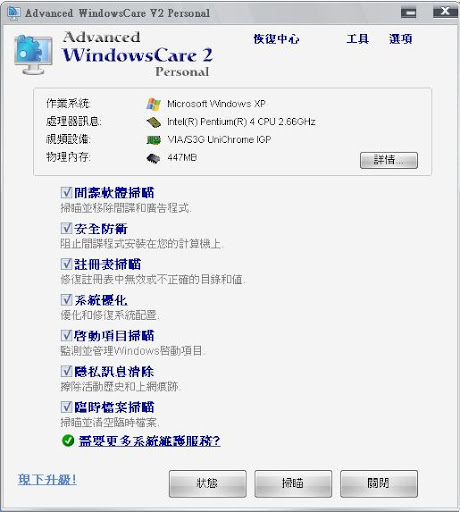
IObit Advanced WindowsCare 是一款能分析系統性能的優化軟件。它通過對系統各類分析診斷能做到電腦安全、磁碟清理、錯誤修復和優化微調 ,有效地針對性地進行修改、優化。當然還有優化前的備份功能,優化後系統性能和網絡速度都會有明顯提升!

This comprehensive PC-care utility has a one-click approach to helping protect, repair and optimize your PC. Advanced WindowsCare Personal Edition helps protect, optimize, and repair your PC –– with daily use.
Features of this fantastic, award-winning, 100% free program include:

* Ending slow downs, freezes, crashes, and security threats.

* Scanning and finding what other utilities miss on your PC.

* Keeping your PC error-free and running more smoothly than ever.

* Designed for Windows Vista, XP, and 2000.

* Over 10,000,000 downloads since 2006.

* Availability is free of charge for private use.

* Plus, Advanced WindowsCare Personal is 100% safe and clean with no adware, spyware, or viruses.


/
Related Posts with Thumbnails
火熱文章 :
Check PageRank MyHotPost
Sitetag
Widget by Ayuda para Blog

總人氣:
 

『發夢』©King 版權所有 © 2008-2010
♥ Log in ♥

Revolution Two Church theme Blogger Template
by 『發夢』© King Converted to Red Version