強力推薦

必看推介

顯示具有 網絡相關 標籤的文章。 顯示所有文章

星期三, 4月 22, 2009

[軟件更新通知] 管理及查看你的電腦用了那個連接埠 (CurrPorts 1.65)

1 意見


What's NewVersion 1.65:
Added drag And drop icon in the toolbar that allows to to easily filter by the desired application. Simply drag the target icon into the window of the application, and CurrPorts will display only the opened ports of this application.


CurrPorts 是一套可以管理及查看你本機的 TCP/IP 和 UDP 通訊連接埠,那一個連接埠已經在開啟,那一個可疑的程序都一目了然,方便判斷是否被植入木馬或中病唷~而且有相關資料顯示,亦可以將資料輸出為文字檔、html、csv、xml等檔案。

CurrPorts displays the list of all currently opened TCP/IP and UDP ports on your local computer. For each port in the list, information about the process that opened the port is also displayed, including the process name, full path of the process, version information of the process (product name, file description, and so on), the time that the process was created, and the user that created it.
In addition, CurrPorts allows you to close unwanted TCP connections, kill the process that opened the ports, and save the TCP/UDP ports information to HTML file , XML file, or to tab-delimited text file.
CurrPorts also automatically mark with pink color suspicious TCP/UDP ports owned by unidentified applications (Applications without version information and icons)


 軟件提供的下載: zSHARE RapidShare Badongo Megaupload

星期一, 3月 30, 2009

[軟件更新通知] 小巧方便查詢域名資料 (WhoisThisDomain)

0 意見


WhoisThisDomain 是一個小巧方便得到任何域名的擁有者和註冊資料的小程式,它可以一次查詢多個域名,而且也可以將結果輸出為一個 html 報告

This utility allows you to easily get information about a registered domain. It automatically connect to the right WHOIS server, according to the top-level domain name, and retrieve the WHOIS record of the domain.
It support both generic domains and country code domains.


What's NewVersion 1.32 - Added/Updated the whois servers for .in, .ie, .me, .tel, and co.nl domains.
Version 1.31 - Fixed bug: Wrong domain status displayed for .ca and .it domains.
Version 1.30 - Fixed the whois servers for .at, .be, .bg, .cz, and others.
Version 1.29 - Fixed bug: The size of domains text-box was limited to 32 KB.


下載點:
zSHARE
RapidShare
Badongo
Megaupload

官方英文版下載 & 官方繁體語言檔下載

星期三, 3月 18, 2009

不受限制而 RSS Feed 全文訂閱

6 意見

我相信很多人都會用 RSS 訂閱來看資訊,而我也一樣用 Google Reader 來訂閱蠻多網站和新聞資料,但好多時你都會發現有些站只會摘要輸出來分享分章,往往要你到他的主頁才能看到全文,本人對此情況亦沒有覺得甚麼不好,不過有時去到的網內太慢時就會又愛又恨。

我在 The Voice 發現一個蠻厲害的東西,雖然不是站長的出品,而它也是介紹出來,不過沒關係,好東西就應該分享分享~

まるごとRSS」是一個可以將你網站用全文輸出的方法來給你訂閱(RSS),雖然是日文網站,但其實十分易用,只要輸入網址(或 Feed URL)。

它會分析你本身的 Feed URL 而另外給你一個 RSS 訂閱的 URL,那你就可以用此 URL 來另外訂閱該站而不受摘要輸出的限制來全文訂閱。


雖然它的原理我也不太清楚,我也蠻認同 The Voice 作者的見解,應該每次更新也爬一次你的站來重新輸出 XML,姑且勿論它的方法,不過看來如果每個人也用此全文訂閱,它會不會好快就 Down 下來~~呵呵
(註:我看它的日誌中有一段是 「障害発生報告(2009/02/14 23:36:46)
2/14 15:00〜23:00の間サーバ全体において障害が発生致しました。現在は復旧しております。」

意思是它在 2009/2/14日發生故障)


不過我倒有點擔心,如果每個人也用此方法來訂閱,可能會直接影響 Google Adsense 的用戶~~鳴~~~

星期二, 3月 10, 2009

一個可選擇地方來測試網路速度的網站 (蠻準確的唷!!)

0 意見

一個不錯的測試網路速度的網頁,可以選擇你所在的地區來測試,準確度大大提高,並分析上下載速度!!

有趣的是還可以制作貼紙


有興趣可到此測試一下^^

星期六, 1月 31, 2009

[軟件更新通知] 管理及查看你的電腦用了那個連接埠 (CurrPorts 1.60)

0 意見


What's NewVersion 1.60:
Added new column: Window Title (The window title of the process)
Added 'Cleal All Filters' option.
Added 'Include Selected Processes In Filters' option. Allows you to easily filter by selected processes.


CurrPorts 是一套可以管理及查看你本機的 TCP/IP 和 UDP 通訊連接埠,那一個連接埠已經在開啟,那一個可疑的程序都一目了然,方便判斷是否被植入木馬或中病唷~而且有相關資料顯示,亦可以將資料輸出為文字檔、html、csv、xml等檔案。

CurrPorts displays the list of all currently opened TCP/IP and UDP ports on your local computer. For each port in the list, information about the process that opened the port is also displayed, including the process name, full path of the process, version information of the process (product name, file description, and so on), the time that the process was created, and the user that created it.
In addition, CurrPorts allows you to close unwanted TCP connections, kill the process that opened the ports, and save the TCP/UDP ports information to HTML file , XML file, or to tab-delimited text file.
CurrPorts also automatically mark with pink color suspicious TCP/UDP ports owned by unidentified applications (Applications without version information and icons)

不懂下載請看這篇
本地程式下載(繁體版) (右鍵下載 及 改成 .rar)
官方英文版下載 & 官方繁體語言檔下載

星期三, 1月 21, 2009

劉德華兒子 Andox & Box 陪你過牛年!(MSN 9.0)

0 意見


不知大家認得這款公仔嗎?就是劉德華兒子 Andox & Box!!
MSN 9.0 在牛年推出一系列它的表情符號、動態圖片和主題窗背景供大家使用唷,有興趣可以到 官方網站 看看

發夢 King發夢 King發夢 King發夢 King發夢 King發夢 King發夢 King發夢 King

[軟件更新通知] 管理及查看你的電腦用了那個連接埠 (CurrPorts 1.56)

0 意見


What's NewVersion 1.56:
Added new option: Ask before any action. (If you uncheck this option, CurrPorts won't ask you any question before closing ports/applications)


CurrPorts 是一套可以管理及查看你本機的 TCP/IP 和 UDP 通訊連接埠,那一個連接埠已經在開啟,那一個可疑的程序都一目了然,方便判斷是否被植入木馬或中病唷~而且有相關資料顯示,亦可以將資料輸出為文字檔、html、csv、xml等檔案。

CurrPorts displays the list of all currently opened TCP/IP and UDP ports on your local computer. For each port in the list, information about the process that opened the port is also displayed, including the process name, full path of the process, version information of the process (product name, file description, and so on), the time that the process was created, and the user that created it.
In addition, CurrPorts allows you to close unwanted TCP connections, kill the process that opened the ports, and save the TCP/UDP ports information to HTML file , XML file, or to tab-delimited text file.
CurrPorts also automatically mark with pink color suspicious TCP/UDP ports owned by unidentified applications (Applications without version information and icons)

不懂下載請看這篇
本地程式下載(繁體版) (右鍵下載 及 改成 .rar)
官方英文版下載 & 官方繁體語言檔下載

星期一, 1月 12, 2009

寄給自己一封未來的信

0 意見

大家有無突發奇想,會想給自己一封未來的信?

呵呵~這個網站幫到你


先填寫自己 Email Address
(最多可以輸入4個,按 就可以加多一個)

之後 Subjuct 和內容之類的東西不用我教吧 =v=
再來就是你想要的日期,最長可以到 2035 年(27年唷)
再來就是可以選擇 Private (私人) or Public (共公),如果選擇了 Public 就會以匿名方式顯示給其他用家觀看到.之後只要 Send 就可以了^^

之後你本身的 Email 就會收到一封確認信(原因我想是避免使用此功能製造垃圾郵件 - Spam Email)

按它的 activate link (啟動連結) 就可以了,有人會想,那給別人未來的信也可以吧?!
我想是可以的,不過別人的 Email 也會收到一封確認信,那...我只可以說...你那朋友一定會不斷問你寫了甚麼=v= 那就變成一封"即時Email" 了~~呵呵

星期一, 12月 22, 2008

重有3日聖誕,還不快寄聖誕卡!!

0 意見

還有3天就是聖誕節,大家有無寄聖誕卡給人?還沒有,那可以選擇此一種網上聖誕卡
首先上傳你想要的人頭相(豬頭相也可以^^) 不過圖片不能大過 2MB 和 高度不要超過 640px 的 JPG 檔


之後就可以有3種方式將圖片代入聖誕公公頭上
- 放大縮小
- 左右角度
- 圖片位置


弄好就可以按 Next 來制作^^

我的制成品
只要將網頁 Email 給人就可以~~呵呵呵
制作網站 : http://www.dancingsantacard.com/santa_yourself_1.aspx

星期三, 12月 17, 2008

集 200 多種線上小遊戲

0 意見

聖誕節快到,有趣地此網站竟然將主頁變成聖誕歌...不會想大家聖誕無聊就去玩玩吧...

不過小遊戲真的多得眼花撩亂,不過也有拳王,水管,泡泡等經典小遊戲...
如果上班無聊,家中無聊..玩玩也無妨...呵呵
不過現時Online Game 那麼多,真的不知道還有多少人在家會玩小遊戲吧...
上班也可能會吧...呵呵

有興趣去看看官方網站

星期六, 12月 06, 2008

[軟件] 管理及查看你的電腦用了那個連接埠 (CurrPorts 1.55)

0 意見


CurrPorts 是一套可以管理及查看你本機的 TCP/IP 和 UDP 通訊連接埠,那一個連接埠已經在開啟,那一個可疑的程序都一目了然,方便判斷是否被植入木馬或中病唷~而且有相關資料顯示,亦可以將資料輸出為文字檔、html、csv、xml等檔案。

CurrPorts displays the list of all currently opened TCP/IP and UDP ports on your local computer. For each port in the list, information about the process that opened the port is also displayed, including the process name, full path of the process, version information of the process (product name, file description, and so on), the time that the process was created, and the user that created it.
In addition, CurrPorts allows you to close unwanted TCP connections, kill the process that opened the ports, and save the TCP/UDP ports information to HTML file , XML file, or to tab-delimited text file.
CurrPorts also automatically mark with pink color suspicious TCP/UDP ports owned by unidentified applications (Applications without version information and icons)

不懂下載請看這篇
本地程式下載(繁體版) (右鍵下載 及 改成 .rar)
官方英文版下載 & 官方繁體語言檔下載

星期二, 12月 02, 2008

[軟件更新] 離線查看 IP 各類信息的小工具 (IPInfoOffline v1.05)

0 意見


IPInfoOffline 是一款查看指定 IP 的各類信息的小工具,而且還是一款可以不用連上互聯網也能取得資料,原因IP資料庫已經壓縮包含在主程式當中,當然也是可以將資料輸出為文字檔、html、csv、xml等檔案。

IPInfoOffline Allows you to view information about IP addresses, without connecting any external server. It uses a compressed IP addresses database that is stored inside the exe file.
For each IP address, the following information is displayed: IP block range, Organization (RIPE, ARIN, APNIC, LACNIC or AFRINIC), Assigned Date, Country Name, and Country Code. After retrieving the information about the desired IP addresses, You can copy the information to the clipboard, or save it into text/html/xml/csv file.


What's NewVersion 1.05:
Added new option: Don't add duplicate IP addresses.
Added new option: Don't add duplicate IP blocks.


不懂下載請看這篇
本地程式下載(繁體版) (右鍵下載 及 改成 .rar)
官方英文版下載 & 官方繁體語言檔下載

星期一, 11月 10, 2008

[軟件] 離線查看 IP 各類信息的小工具 (IPInfoOffline v1.00)

0 意見


IPInfoOffline 是一款查看指定 IP 的各類信息的小工具,而且還是一款可以不用連上互聯網也能取得資料,原因IP資料庫已經壓縮包含在主程式當中,當然也是可以將資料輸出為文字檔、html、csv、xml等檔案。

IPInfoOffline Allows you to view information about IP addresses, without connecting any external server. It uses a compressed IP addresses database that is stored inside the exe file.
For each IP address, the following information is displayed: IP block range, Organization (RIPE, ARIN, APNIC, LACNIC or AFRINIC), Assigned Date, Country Name, and Country Code. After retrieving the information about the desired IP addresses, You can copy the information to the clipboard, or save it into text/html/xml/csv file.

不懂下載請看這篇
本地程式下載(繁體版) (右鍵下載 及 改成 .rar)
官方英文版下載 & 官方繁體語言檔下載

[軟件] 輕易拿下 DNS 解析記錄 (DNSDataView v1.00)

0 意見


DNSDataView 是一款能拿取指定的網域的 DNS 解析記錄(MX, NS, A, SOA),當然它是以 NSlookup 以圖像化形式表達出來。亦可以將資料輸出為文字檔、html、csv、xml等檔案。


This utility is a GUI alternative to the NSLookup tool that comes with Windows operating system. It allows you to easily retrieve the DNS records (MX, NS, A, SOA) of the specified domains. You can use the default DNS server of your Internet connection, or use any other DNS server that you specify. After retrieving the DNS records for the desired domains, you can save them into text/xml/html/csv file.

不懂下載請看這篇
本地程式下載(繁體版) (右鍵下載 及 改成 .rar)
官方英文版下載 & 官方繁體語言檔下載

星期四, 10月 16, 2008

WhoisThisDomain 小巧方便查詢域名資料小程式

0 意見


WhoisThisDomain 是一個小巧方便得到任何域名的擁有者和註冊資料的小程式,它可以一次查詢多個域名,而且也可以將結果輸出為一個 html 報告


不懂下載請看這篇
本地程式下載(繁體版) (右鍵下載 及 改成 .rar)
官方英文版下載 & 官方繁體語言檔下載

星期二, 9月 09, 2008

WLM 9 測試版

0 意見

WLM (Windows Live Messenger) 其實已經成為香港台灣外國的主流聊天工具,當大家都用緊 8.5 時,我竟然發現有 9.0 測試版(洩漏版),但暫時只有英文版本,如果大家有興趣去做白老鼠的話,可以去下載來玩玩^^

新版本當然功能上多了一點(迷之聲:廢話,如果沒多出新的來做甚麼0.0)

- 多點登入(不是多重帳號登入,多點意思係不同地點同一帳號登入,用意何在?!我想應該是給一些用MSN 來做客戶服務使用,當然要在設定上開啟才可使用)
- 群發
- 群組功能
- PhotoShare (可以在聊天視窗下共享照片)

不過這始終是測試洩漏版,所以可能有未知的情況問題會發生,建議有一定知識才測試用用=v=

解壓後有線上安裝版(wlsetup.exe)和直接安裝版(Messenger.msi),任君選擇!

下載位置

星期六, 9月 06, 2008

利用瀏覽器 - 免費打長途 (不用裝程式)

2 意見

免費的 PC to Free 服務,剛剛試過打去自己公司 =0= 真的成唷 .... 也沒多延遲感


只要在以上圖示位置選擇國家,它便會自動選擇了國家區號(香港 852,中國 86,台灣 886),那之後只要打上自己想打的號碼就成!

不過沒有免費午餐吧,所以看看會有甚麼限制,原來當你打電話前,會播放一段廣告,之後就會接上,而且限制了一天2次,每次5分鐘!不過老實說,限制次數當然是記錄IP才成,所以真的要打無限次,方法多的是,只要轉轉 Proxy 就成,坊間程式多的是!不過總之用電腦打電話,好像沒手感...呵呵!

不妨去感受一下 Free PC to Phone

星期五, 8月 29, 2008

FluxEye v1.01 流量之眼

0 意見

即時顯示應用軟體處理序的流量(頻寬佔用),允許使用者設定處理序的上傳速率限制,同時提供簡單的限速規則。

限速模式分為始終限速和動態限速。將處理序設為動態限速時,限速由其它應用程式的資料收發動作觸發。如果其它應用程式空閒,即自動恢復不限速狀態,以提高頻寬利用率。

究竟什麼軟體拖慢了網速,借助FluxEye,一目瞭然。


官方網站 (簡體)

流量之眼 (FluxEye)V1.01 繁中免安裝版.rar

流量之眼 (FluxEye)V1.01 繁中免安裝版.rar

提供流量之眼 (FluxEye),著作權歸該資源的合法擁有者所有。

聲明︰
1.分享軟體僅供交流測試之用,無販售行為及獲得任何利益。
2.提供的軟體皆為測試之用,請勿作商業上之用途。
3.分享此繁體中文語言檔,請保留此說明部分及標示來源。
心動總是.無來由(編譯)

星期五, 6月 06, 2008

一個不錯的網上空間 (支援 RSS & Widget)

0 意見

其實網絡空間層出不窮 , 根本多到不得了, 為何我會介紹呢一個?

如果只係計傳送速度黎講 , 此屬一般 (不過有幾多間免費網上空間會快= =;;)

此網上空間和其他一樣,可注冊會不注冊使用 , 不注冊也能以檔案上限 150m 上傳 ,但注冊後就很多功能,
2GB 空間 和 500m 檔案上限 , 但這不是重點 , 而是它的檔案管理做得蠻好 , 無論建立資料夾 , 加密碼 , 資料夾共享 , 簡單直接下傳 和 沒有廣告干擾 , 還可以分 TAg , 圖片直接觀看 , 支援搜查檔案 , 出免地支援 RSS 和 Widget 功能.

圖片直接觀看:

資料夾共享:

Widget Code:


資料夾和檔案都可以設定為共享 , 因為可以設成 Public Link 供其他人使用 , 十分方面自己的朋友們下傳, 亦可直接將連結以電郵方式發出 , 用戶亦可將共享資料夾制成 Widget , 放在 blog 上供人下傳 , 還可以指定某一個資料夾可輸出 RSS , 讓用戶追蹤到有新檔提供 , 非常實用.

官方網頁

星期二, 6月 03, 2008

修正 XP 連線數 TCP/IP Patcher v1.1.0.05 別讓XP SP3把你 P2P 限制住

0 意見


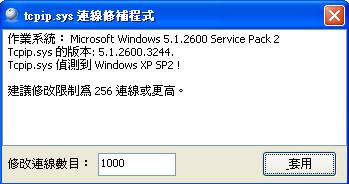
TCP/IP Patcher v1.1.0.05 修正 XP 連線數

當大家更新了微軟的修補程式後,往往就會將XP連線數限制重回10 , 這個小程式可以將設定增加連線數的需求 , 如果你有安裝了Windwos XP SP3修補程式,更加需要用吧!!

通常這個連線數的調整大部分是有使用P2P軟體(網絡電視,BT) 或RSS閱讀器的電腦才會用到,一般把它設定成256以上應該都可以了!

/
Related Posts with Thumbnails
火熱文章 :
Check PageRank MyHotPost
Sitetag
Widget by Ayuda para Blog

總人氣:
 

『發夢』©King 版權所有 © 2008-2010
♥ Log in ♥

Revolution Two Church theme Blogger Template
by 『發夢』© King Converted to Red Version